
Global eSIM Explained: How One Travel SIM Replaces Physical Cards Worldwide
Ever wished your phone could just work anywhere in the world without hunting for a local SIM card? A global eSIM is a built-in digital profile that lets you connect to cellular networks across multiple countries, all from a single QR code scan or app download. Once installed, you can switch between regional carriers right from your settings, so staying online while traveling feels almost effortless. It’s simply the most seamless way to keep your data flowing across borders without swapping physical cards.
What Exactly Is a Global eSIM and How Does It Differ From a Physical SIM?
A global eSIM is a tiny, embedded chip in your phone that stores a digital profile, letting you connect to multiple carriers around the world without ever swapping a plastic card. Unlike a physical SIM, which you have to buy, insert, and remove, a global eSIM activates in minutes via a QR code or app, so you can switch networks instantly as you travel. The biggest difference is flexibility: a physical SIM locks you to one carrier until you replace it, while a global eSIM holds several profiles simultaneously, meaning you keep your home number active while adding a data plan for another country. No more hunting for local SIM shops or fumbling with tiny trays. You simply scan, pay, and connect. However, your phone must be eSIM-compatible and unlocked, which is now standard on most modern devices. That’s the core practical shift—digital convenience replaces physical hardware.
The Core Technology: How a Digital SIM Profile Works Inside Your Phone
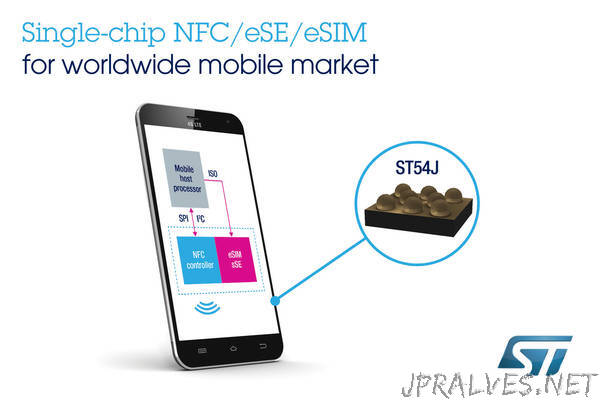
Instead of a plastic card, your phone contains a tiny, soldered chip called the eUICC. When you scan a QR code from a global eSIM provider, the carrier’s encrypted profile is downloaded and written directly into this chip’s secure memory. This profile acts as a virtual SIM, holding your unique authentication keys and subscriber credentials. The phone’s modem then reads this digital data to authenticate with the network, exactly as it would with a physical SIM. Critically, because the profile is software-defined, you can switch between carriers or local data plans on the fly, without ever swapping a card. This is the core technology enabling instant remote provisioning on any compatible device.
Key Differences in Flexibility: Switching Networks Without Swapping Cards
The defining flexibility of a global eSIM lies in its ability to switch networks digitally, eliminating the physical swap entirely. With a physical SIM, changing carriers demands hunting for a new card, ejecting a tray, and handling tiny fragile chips—a process that fails when traveling. A global eSIM lets you change profiles in seconds from your device’s settings menu, often while mid-call or mid-download. The practical result is that you can test a local carrier’s speed, switch back to your home network, and then switch again—all without carrying a single spare SIM. This makes network switching without physical card replacement the core advantage for frequent travelers who demand instant, untethered connectivity.
How Do You Set Up and Activate a Worldwide Data Plan on Your Device?
To set up and activate a worldwide data plan via global eSIM, first confirm your device is carrier-unlocked and eSIM-compatible (e.g., iPhone XS or newer, recent Pixel models). Purchase a plan from a provider like Airalo or Holafly, selecting a “global” package that covers multiple countries. After checkout, you’ll receive a QR code or an installation link. Go to **Settings > Cellular > Add eSIM**, scan the QR code, and label it “Data.” Ensure your primary SIM is set for voice, and toggle “Data Roaming” on for the eSIM; the plan activates immediately upon first connecting to a supported network. *Q: How do I switch between plans while abroad? A: In Settings > Cellular, tap the eSIM and choose “Turn On This Line” for data, or disable your home line to avoid accidental usage.* Finally, test by turning airplane mode on/off to force a network refresh.
Step-by-Step Installation: Scanning a QR Code or Using a Carrier App
To activate a global eSIM, **step-by-step installation** typically begins with scanning a QR code provided by your chosen provider. Open your device’s settings, navigate to Cellular or Mobile Data, select “Add eSIM,” and point your camera at the QR code. The profile downloads automatically, and you may need to label it (e.g., “Travel”) and set it as your data line. Alternatively, using a carrier app simplifies activation: install the provider’s app, log in, purchase a plan, and tap “Install eSIM”—the app pushes the profile directly to your device. After installation, enable data roaming and select the new line as active to start browsing immediately.
Q: What if my QR code scan fails during step-by-step installation?
A: Check your camera focus and lighting, ensure the QR code is free of glare, or manually enter the activation code (usually listed under the QR code) in the “Enter Details Manually” option within your device’s eSIM settings.
Managing Multiple Profiles: Storing Several Plans and Choosing the Active One
To manage multiple profiles with a global eSIM, store several plans directly in your device’s SIM manager, then designate the active one per slot. Choosing the active global eSIM profile takes seconds: open settings, select “Cellular Plans,” and toggle the line you want for data. Keep your home SIM active for calls while routing data through the travel profile. You can switch profiles repeatedly at no extra cost, but only one data plan runs at a New Zealand eSIM time. Follow this sequence:
- Download and install each plan from your provider’s app or QR code.
- Label each profile by destination or validity period to avoid confusion.
- Select “Default Data Line” and pick the profile for your current trip.
- Disable unused lines to prevent accidental roaming charges.

Compatibility Check: Which Phones, Tablets, and Laptops Support This Feature
Before activating a global eSIM, run a compatibility check on your device to avoid activation failures. Most recent smartphones—like iPhone 14 and newer, Google Pixel 6+, and Samsung Galaxy S21 and newer—support eSIM, but carrier locks can block installation. Tablets such as iPad Pro, iPad Air (3rd gen+), and select Surface Pro models work, while laptops with built-in eSIM (e.g., Surface Pro 9, Lenovo ThinkPad X1 Carbon) support it. Always verify your device’s IMEI is eSIM-compatible via its settings menu, and confirm it’s unlocked.
- Check “Cellular” or “Mobile Data” settings for an “Add eSIM” option.
- Confirm your device model is listed on the provider’s supported devices page.
- Ensure no carrier SIM lock prevents eSIM activation.
What Are the Real-World Benefits of Using a Single Number Across Borders?
A single number via a global eSIM means your identity stays constant while your location changes. You avoid the chaos of juggling multiple SIMs, missed calls, and explaining a new country code to every contact. Your banking alerts, two-factor authentication, and ride-share confirmations arrive instantly on the same line, even as you cross borders. This eliminates the risk of losing access to critical accounts because a temporary number can’t receive verification texts. For freelancers or remote workers, it creates a seamless, professional presence—clients dial your usual number, and you answer, no matter if you’re in Lisbon or Bangkok.
You retain full control over your communication trail, with every call and message preserved in one thread, making expense reconciliation and client follow-ups effortless.
The practical payoff is trust: your network never loses you, and you never miss a critical update.
Instant Connectivity Upon Landing: Avoiding Airport SIM Kiosk Hassles
The moment your wheels touch down, the last thing you want is to join a disorganized queue at an airport SIM kiosk, fumbling with passports and confusing local data plans. With a global eSIM, instant connectivity upon landing is automatic, as your device activates the moment it connects to a local network. You bypass the physical hassle entirely, stepping straight into an arriving taxi or messaging your family without a signal gap. This seamless transition means you start your trip productively, not troubleshooting plastic cards. Q: Why is instant connectivity upon landing crucial for avoiding airport SIM kiosk hassles? A: It eliminates wasted travel time, language barriers at kiosks, and the risk of buying a defective or overpriced local SIM, giving you immediate, reliable service.
Cost Transparency: Pre-Paid Data Packs vs. Surprise Roaming Charges
The core financial advantage of a global eSIM lies in its upfront pricing model. Instead of facing the opaque, meter-running anxiety of traditional roaming, travelers purchase a pre-paid data pack with a fixed cost per gigabyte before departure. This transforms data spend from an unpredictable variable into a known, budgeted line item. There are no post-trip bill shocks, no hidden per-megabyte tariffs, and no dreaded “daily cap” fees that activate automatically. You see the exact price, the exact data allowance, and the exact validity period, making comparison shopping between providers straightforward. This **predictable cost structure** ensures your connectivity spend matches your plan, not your panic level.

Cost transparency means choosing a fixed, pre-paid data pack over the financial uncertainty of post-paid roaming charges.
Keeping Your Primary Number Active: Dual SIM Functionality Explained
Keeping your primary number active is effortless with dual SIM functionality built into modern global eSIM devices. Instead of swapping physical cards or losing access to banking apps and two-factor authentication, you install a travel eSIM for data while your home SIM remains live for calls and SMS. This setup ensures your primary line receives verification codes and emergency contacts without roaming charges for data—you simply route cellular data through the eSIM’s local network. Dual standby mode handles both signals simultaneously, so you never miss a vital message. Q: *Does dual SIM drain battery faster?* A: Yes, slightly, but modern devices manage power efficiently, and the convenience of keeping your primary number active far outweighs the minor impact.
How to Choose the Right Global Data Plan for Your Travel Style?
Choosing the right global eSIM plan hinges on matching data volume to your real habits, not the plan’s headline size. For frequent short trips, prioritize a regional plan with moderate data and a 30-day validity to avoid wasting money. If you’re a digital nomad or heavy streamer, opt for a high-data, multi-month plan from a provider that lists speed tiers clearly, since “unlimited” often throttles after a daily cap. Think about the split between urban and rural travel: a plan with broad local network partners beats one with just major-city coverage. Ask yourself: “Do I mostly need navigation and messaging, or am I uploading large files daily?” That answer dictates whether a 5GB monthly or a 50GB annual plan fits. Finally, check if the plan’s app allows instant top-ups, so you can adjust mid-trip without buying a new eSIM entirely.
Data Allowance vs. Speed: Matching Your Usage to a Plan (Streaming vs. Navigation)
When choosing a global eSIM, match the data allowance to your dominant activity. Navigation apps like Google Maps consume roughly 5–10 MB per hour, making a small 1 GB plan sufficient for weeks of driving. Streaming video, however, uses about 1 GB per hour for standard definition and up to 3 GB for HD, quickly exhausting a budget allowance. Speed also matters: a 5 Mbps cap handles navigation flawlessly but may buffer high-bitrate streams, so prioritize lower-speed, higher-allowance plans for streaming and vice versa for light usage. Always estimate your daily consumption before buying. Q: Is a 1 GB plan enough for a two-week trip? A: Yes, if you stick to navigation, messaging, and email; no, if you plan to stream more than a few hours total.

Regional vs. Truly Worldwide Coverage: Understanding Signal Reach
When choosing a global eSIM, the distinction between regional and truly worldwide coverage dictates your actual connectivity. Regional eSIMs bundle neighboring countries, like all of Europe or Southeast Asia, offering lower rates if your itinerary stays within that zone. However, crossing into an unlisted nation means instant dead zones. Truly worldwide coverage, conversely, relies on a mesh of partner networks across every continent, ensuring signal reach in remote or transit locations like international airports and island nations. If your travel style involves spontaneous border crossings or multi-continent layovers, worldwide access eliminates the hassle of re-purchasing plans. For a single-country trip, regional saves money; for unpredictable routes, global reach is the only safety net.
Plan Duration and Top-Up Options: Short Trips vs. Long-Term Nomads
For a week-long getaway, a fixed 10-day plan with a hard data cap beats any subscription, because you pay once and discard it. But the real decision hinges on renewal mechanics: short-trip users need instant, one-tap top-ups that activate the moment they land, while long-term nomads must insist on plans that allow flexible data extensions without forcing a new eSIM profile. A nomad who buys a 30-day plan and then needs just four more days on day 29 is better served by a provider offering custom-sized add-ons than one demanding a full month’s renewal. Likewise, check whether your plan auto-suspends after depletion or silently throttles—critical for budgeting across borders where you’ll be hopping countries weekly. Choose duration based on your longest single stay, not your total trip length, and always verify top-up validity doesn’t reset your unused data.
What Practical Tips and Troubleshooting Steps Should First-Time Users Know?
Before departure, confirm your device is carrier-unlocked and eSIM-compatible, then install the eSIM while still on Wi-Fi. Upon arrival, if data fails, manually select the eSIM’s network in your cellular settings rather than using “automatic.” If activation is stuck, toggle airplane mode for 30 seconds, then re-enable it. For persistent issues, re-scan the QR code or re-enter the activation code from your provider’s app. Keep your primary SIM active for calls, but disable its data roaming to avoid surprise charges. If speeds are slow, check that roaming is toggled “on” for the eSIM profile—some phones disable it by default.
Always screenshot your eSIM QR code and installation email before traveling; you may need to reinstall it offline.
Finally, use the provider’s chat support, which typically responds faster than email, and have your order number ready.
Activating Before You Fly: Why Setting Up on Home Wi-Fi Matters
Activating your global eSIM before departure, while connected to home Wi-Fi, is the single most reliable way to avoid travel-day failures. Do this at least 24 hours ahead, as many providers deliver the QR code or installation link via email, which you’ll need data to access. Home broadband also prevents accidental cellular roaming charges during the setup handshake. Furthermore, if your device encounters an activation error, you can troubleshoot with customer support while still having your primary SIM active. Once you land, the eSIM simply connects to local networks—no risky mid-trip downloads. A quick checklist: install, verify the profile appears, then toggle airplane mode once to force a network refresh—all on your couch, not in a foreign airport.
Battery Drain and Connectivity Drops: How to Optimize Settings for Stable Use
To combat battery drain with a global eSIM, disable the inactive line’s data roaming and set the active profile to LTE instead of 5G, as constant network hunting drains power. For connectivity drops, manually select a local carrier under network settings rather than relying on automatic scanning, which triggers instability. Enable Wi-Fi calling to offload weak cellular signals, and turn off background app refresh for apps that don’t need live data. Critically, lock your device to a single network band via your phone’s engineering menu to prevent frequent re-registrations that cause both battery spikes and dropped connections. Schedule a daily reboot to clear cached signal data.
Optimize eSIM stability by locking network bands, disabling roaming on idle lines, and manually choosing carriers—this cuts battery drain and prevents signal drops.
What Happens If You Run Out of Credit or Need to Extend Mid-Trip?
Running out of credit mid-trip doesn’t cut your connection instantly—most global eSIM providers allow you to remain online with reduced speed or send a warning before hard cutoff. To extend, open your provider’s app or portal, select the active plan, and purchase a top-up or data add-on that applies immediately to your existing eSIM, not a new QR code. Topping up mid-trip takes under two minutes if you have Wi-Fi or a secondary signal; if not, switch to a free public hotspot. Some providers let you borrow a small emergency data buffer, repaid on your next top-up. Always check your dashboard for auto-renewal options before departure to avoid a scramble later.